Quick Calendar Event Free
Publisher Description
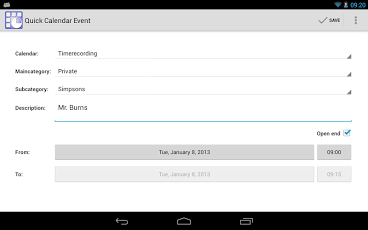
Quick Calendar Event is an App for anyone who wants to track time using Android smartphones or tablets, that uses Google Calendar as a base and provides an easy way for time recordingThis app can quickly and easily insert pre-defined events in your Google Calendar.You create categories, which are often used, like "Customer Support", "Writing mails", "Watching TV" ... and with just one click add calendar events to your google calendar. The goal is to use the Google Calendar as a simple time tracking tool (timesheet). Or just use this app to quickly create calendar events.Calendar events created by Quick Calendar Event will be synchronized like any over events, so you can see they at your desktop PC or tablet or anywhere you use google calendar to track your time. The calendar events can either have an open end or be completed immediately. Events with "open end" can be completed later.Of course, you can choose the Google calendar that is filled with this app.You should choose the working calendar fist! In App: Menu -> Settings -> Calendar.Web: http://think-android.comBlog: http://think-android.blogspot.comKeywords: timesheet, recording, timeclock, time tracker, punch clock, work clock, worktime tracking, time clock, time recorder, quick calendar add, enter, insert
About Quick Calendar Event Free
The company that develops Quick Calendar Event Free is think Android. The latest version released by its developer is 1.0 . This app was rated by 1 users of our site and has an average rating of 3.0.
To install Quick Calendar Event Free on your Android device, just click the green Continue To App button above to start the installation process. The app is listed on our website since 2013-05-28 and was downloaded 21 times. We have already checked if the download link is safe, however for your own protection we recommend that you scan the downloaded app with your antivirus. Your antivirus may detect the Quick Calendar Event Free as malware as malware if the download link to com.think_android.apps.prefedined_calender.free is broken.
How to install Quick Calendar Event Free on your Android device:
- Click on the Continue To App button on our website. This will redirect you to Google Play.
- Once the Quick Calendar Event Free is shown in the Google Play listing of your Android device, you can start its download and installation. Tap on the Install button located below the search bar and to the right of the app icon.
- A pop-up window with the permissions required by Quick Calendar Event Free will be shown. Click on Accept to continue the process.
- Quick Calendar Event Free will be downloaded onto your device, displaying a progress. Once the download completes, the installation will start and you'll get a notification after the installation is finished.
Program Details
System requirements
Download information
Pricing
Version History
version Varies with device
posted on 2013-05-28
version Varies with device
posted on 2013-05-28
Several fixes and updates
